Take your SQL from Good to Great: Part 2
Written by The Count Team
Not always there when you call, but always on time.
This is part 2 of a 4-part series on some of my most valued SQL ‘hacks’. Check out the others in the series:
Part 1: Common Table Expressions
Part 2: All about those dates
Part 3: The other JOINs
Part 4: Window Functions
Part 5: User-Defined Functions
Dates & Times in SQL ⏰
No matter how long you’ve been writing SQL, dealing with dates and times is never a welcome task. They’re surprisingly thorny and can set you back hours when you’re least expecting it. So in this edition of the series, I’ll walk through some helpful date/time ‘hacks’ that should benefit novices and experts alike.
The Action Card 🎮
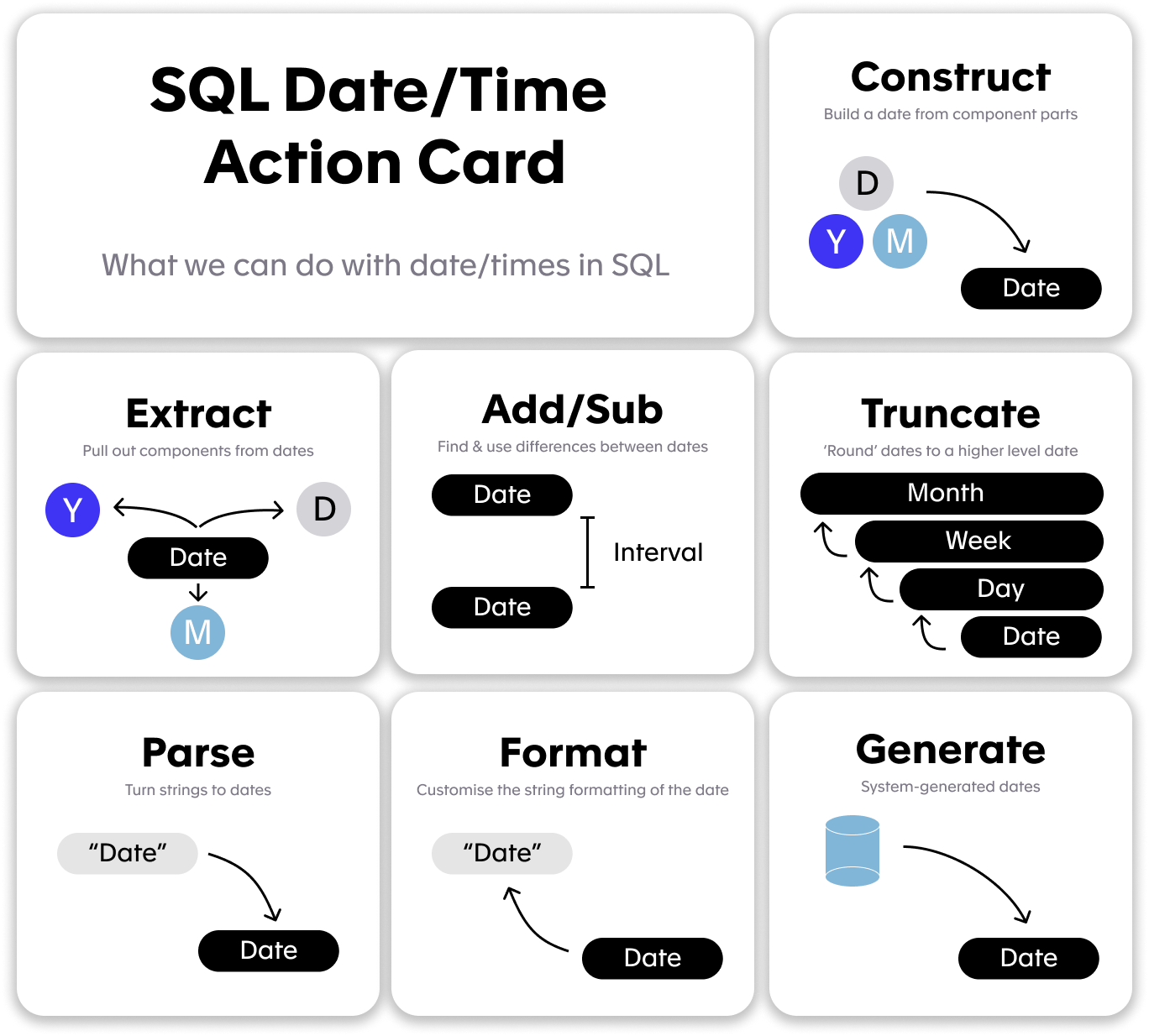
Before diving into code, it’s important to take stock of the high-level tools we have at our disposal. It’s like playing the board game Pandemic (too soon?), and having your character’s action card always visible so you’re reminded of what moves you can make on every turn. Below is our SQL date/time action card, and includes the operations we can perform on our date/times. Within each is action is a series of individual functions and syntax, but it’s helpful to plan out our analysis at this high level.
For example, if you have some sales data with a column of stringified dates and your boss wants to see the quarterly totals, you’re going to need to:
- Parse the strings into dates (“20200110" ➡️ 2020–01–10)
- Truncate the dates into the start of each quarter (2020–01–10 ➡️ 2020–01–01)
- Format those dates to look nice in a chart or a table (2020–01–01 ➡️ “2020 Q1”)
Each dialect of SQL has its own functions for each of these actions, and sadly, its own syntax. So instead of going through each action in painstaking detail, I’ll direct you to the following guides:
My MVHs (Most Valuable Hacks) 🏆
Ok, now the fun part — what are the actual, useful tricks. Here’s a list of my most beloved date/time ‘hacks’:
1. Implicit Casting
Most databases have a sense of ‘implicit casting’, which just means in certain contexts, you can type a date string (“2020–01–01”) and the database will automatically work out that you want to use the DATE Jan 1, 2020. This is particularly useful for filtering on a date column.
Example: The query below will pull all the London weather data for 2017.
--BigQuery Syntax\nselect \n date,\n temp\nfrom example_notebooks.LondonWeather\nwhere date between '2017-01-01' and '2017-12-31'\n\n
Why I like it:If we didn’t have this, I’d have to always cast/parse my string to a date, or use extract functions to get the date parts I want when filtering. But for simple date ranges like this, using the string format of ‘YYYY-MM-DD’ as a filter is something I’ll never stop doing.
ℹ️ Warning: In direct conflict with my next point, most databases require these dates to be in the standard ISO format: ‘YYYY-MM-DD’, but some let you customize this.
2. Think Globally
As an American living in Europe, whenever I see a date like 2020/10/06, I have a moment of panic where I’m not sure if we’re talking about October 6th or June 10th.
Moreover, when I see 2020/10/06 10:00 AM I’m even more confused. Is 10 AM local time? UTC? Daylight Savings Time?
Even if your data and your team are all located in the same timezone, thinking about how your dates and times are stored and presented is crucial. To deal with this, I like to:
- Always use UTC timestamps, and if needed, create new columns for time-zone adjusted dates and times
- When presenting dates I always take the last step to re-format my dates to: MONTH DAY, YEAR (Oct 6, 2020). (But I get that most of the world might do that differently 😂)
Example: In an analysis of my Netflix data, the start time of each program is given as a UTC timestamp. But to work out what times of day I watch the most TV, I needed to convert this to the local time.
--BigQuery syntax\nSELECT \n Start_Time,\n country,\n CASE \n WHEN regexp_contains(country,'GB') then datetime(Start_Time,'Europe/London')\n ELSE datetime(Start_Time,'America/Los_Angeles')\n END local_dt,\n format_datetime('%b %d, %Y',\n case\n WHEN regexp_contains(country,'GB') then datetime(Start_Time, 'Europe/London') else datetime(Start_Time,'America/Los_Angeles')\n end) local_time\nfrom netflix.netflix_cleaned\n\n
Why I like it:Gives me peace of mind to see my dates and times represented as UTC, and local time so I have the choice of how I want to approach each question.
ℹ️ Warning: Each tool will have different defaults in terms of how dates are displayed. For example, in many BI tools, timestamps are automatically adjusted to local time, so your bespoke conversions may be redundant. When in doubt, change your computer timezone and see if the query output changes!
3. Generating Dates
What if instead of finding out when things happened in our dataset, I wanted to know when they didn’t? When did that usernotuse our app? This kind of work requires a set of uniform dates that don’t come from our data at all.
This is particularly helpful when doing cohort analyses.
Example: Let’s say I wanted to see how many hours of TV I watched every day of a given time period (including when I didn’t watch any Netflix). I would need to generate the dates I want to see, then join that to my Netflix data. When I didn’t watch any TV that day, a NULL value should appear on that date:
--gen_dates\n--BigQuery syntax \nselect\n date\nfrom\n unnest(generate_date_array('2018-01-01', '2018-02-02')) as date\n\nselect\n gen_dates.date,\n sum(duration_s) / (60 * 60) hours_watched\nfrom\n netflix.netflix_cleaned\n right join gen_dates on date(netflix_cleaned.Start_Time) = gen_dates.date\ngroup by\n date\n\n
Why I like it: Finding out how often somethingdidn’thappen in sometimes just as if not more important than when it did.
ℹ️ Warning: Annoyingly, each SQL syntax hasverydifferent ways of doing this.
Have some date/time SQL hacks I missed? Let me know in the comments👇
Further reading
- Date/Time documentation for,,,,
- If the subtitle looks familiar, enjoy some 90s beats.